Nano Banana Pro 🍌✨

Google's State-of-the-Art Image Generation Model

Powered by Gemini 3 Pro Image

Meet Nano Banana Pro

Nano Banana Pro (officially known as Gemini 3 Pro Image) is Google DeepMind's most advanced image generation and editing model. This revolutionary AI system brings studio-quality precision, exceptional text rendering, and deep world knowledge to image creation, making it the go-to choice for professionals and creators worldwide.

Built on the powerful Gemini 3 Pro foundation, Nano Banana Pro represents a quantum leap in AI-powered creativity. Whether you're designing marketing materials, creating educational infographics, or bringing your wildest imaginations to life, this model delivers unprecedented control and quality.

🍌 Nano Banana

Gemini 2.5 Flash Image

  • ⚡ Fast & cost-effective
  • 🎨 Great for quick creativity
  • 🔄 Character consistency
  • 📸 Multi-image blending
  • 💰 $0.039 per image

🍌✨ Nano Banana Pro

Gemini 3 Pro Image

  • 🎯 Studio-quality precision
  • 📝 Advanced text rendering
  • 🌍 Robust world knowledge
  • 🔬 Grounding with Google Search
  • 🎬 Professional-grade control

What Makes It Revolutionary?

📝 Perfect Text Rendering

Generate crystal-clear, legible text directly in images across multiple languages. Perfect for posters, mockups, and multilingual content.

🎨 Studio-Quality Control

Exercise fine control over lighting, camera angles, focus, color grading, and composition for professional results every time.

🌍 Deep World Knowledge

Leverages Gemini's extensive understanding to create factually accurate representations, from biological diagrams to historical scenes.

🔍 Google Search Grounding

When enabled, connects to real-time web content for data-driven, up-to-date visual outputs.

✏️ Advanced Editing

Masked editing, lighting transformations, multi-image blending, and iterative refinement with natural language.

🎭 Character Consistency

Maintain the same character appearance across multiple images for storytelling and brand assets.

Example 1: Comic Creation : Getting started with Nano Banana Pro
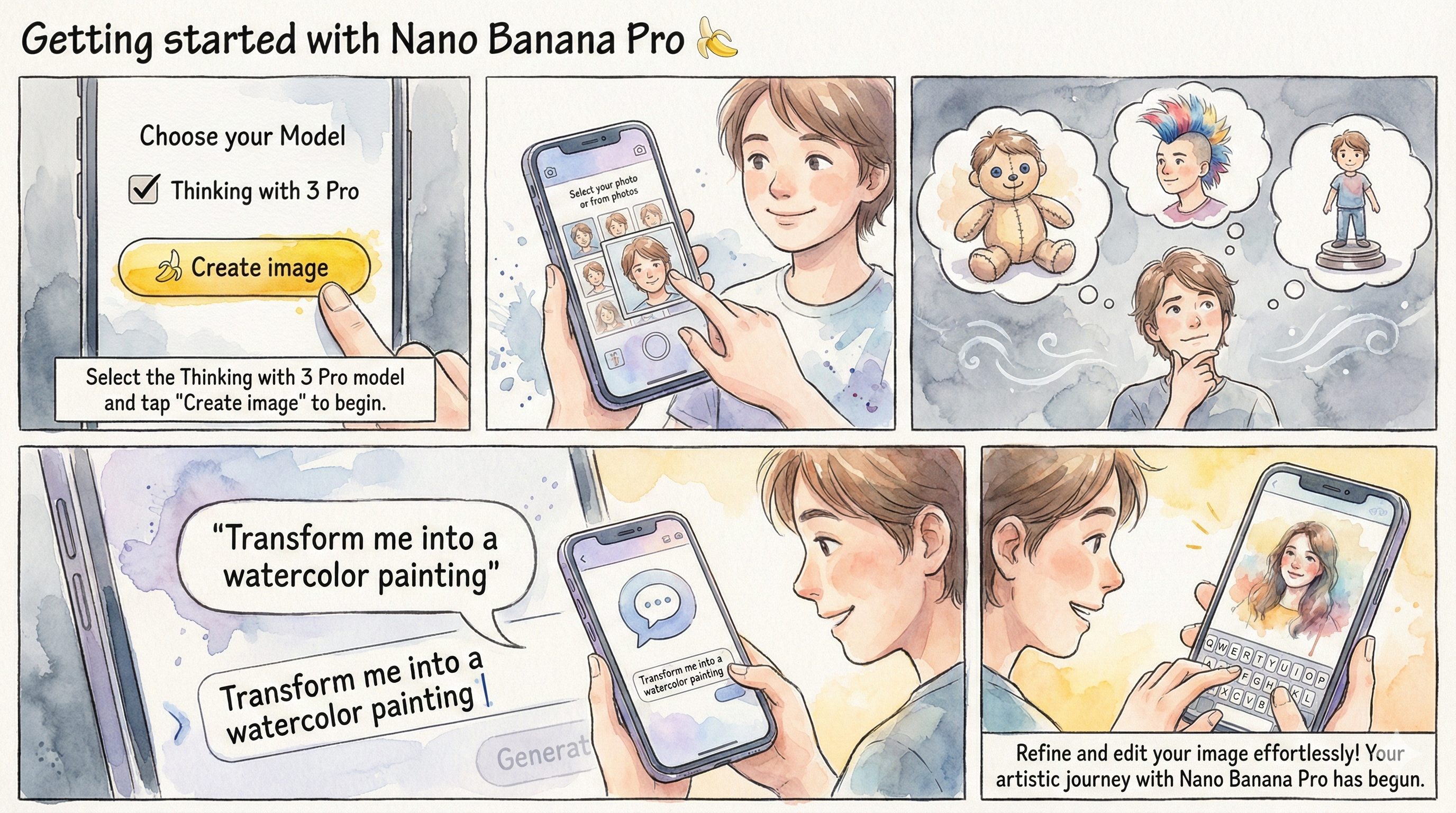
Medical Anatomy Infographic Generated by Nano Banana Pro
📝 Click to View Detailed Prompt
Create a comic with the title: Getting started with Nano Banana Pro 🍌. Panel 1: A mobile interface on Gemini, rendered in a poetic watercolor-ink style with fine ink outlines and soft, bleeding washes. The interface is friendly and a hand painted with expressive brushwork taps a prominent button labeled “🍌 Create image”. Above the button it should say “Choose your Model” then below there should be a checkbox that says “Thinking with 3 Pro” Muted greys and blues dominate the background. The button has a vivid yellow accent. “ Select the Thinking with 3 Pro model” and tap "Create image" to begin. Panel 2: A cheerful person is depicted adding their selfie from the phone’s camera. The user's face is drawn with soft outlines and warm pastel colors, while the phone and UI maintain the delicate water-ink aesthetic. Visible paper grain adds to the texture. Panel 3: The person thinks about what to create. In the background, different options are visualized to show what they’re thinking, including — them as a plushie, them with a mohawk hairstyle, and a figurine. These options are clearly rendered behind the person in the same style as the rest of the comic. Panel 4: The person is shown adding a style prompt, with a speech bubble saying “Transform me into a watercolor painting”. The text is integrated into the panel's watercolor-ink look, and the interaction feels natural and intuitive. Panel 5: The person is seen editing the image by simply typing into Gemini. The scene captures the ease of this interaction, with the final edited image, now in a watercolor style, appearing on the screen. The overall tone is friendly, instructional, and inspiring. It feels like a mini tutorial comic, all conveyed through the specified delicate water-ink illustration style. Make the aspect ratio 16:9.

Example 2: Elegant Multilingual Restaurant Menu
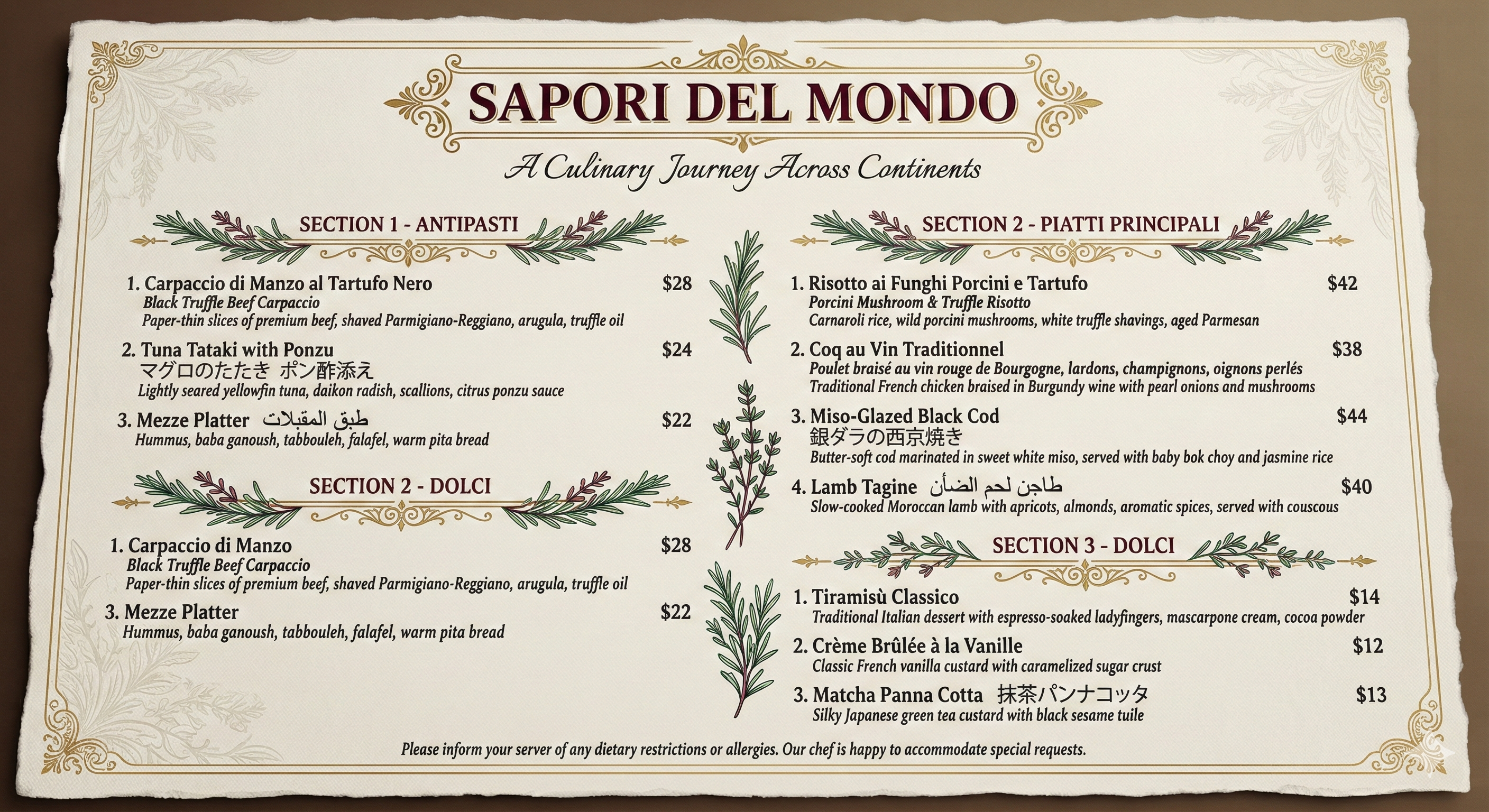
Multilingual Menu Design Generated by Nano Banana Pro
📝 Click to View Detailed Prompt
Design an elegant, high-end restaurant menu for a fusion restaurant called "Sapori del Mondo" (Flavors of the World). The menu should be presented in a sophisticated layout with a textured cream-colored background that resembles fine linen paper. At the very top, create an ornate header with decorative flourishes featuring the restaurant name "SAPORI DEL MONDO" in an elegant serif font (like Didot or Bodoni) in deep gold lettering. Below this, add the tagline "A Culinary Journey Across Continents" in italicized script. Divide the menu into three main sections with decorative dividers between them: SECTION 1 - ANTIPASTI (Starters): 1. "Carpaccio di Manzo al Tartufo Nero" - English translation below: "Black Truffle Beef Carpaccio" - Description in smaller text: "Paper-thin slices of premium beef, shaved Parmigiano-Reggiano, arugula, truffle oil" - Price: "$28" 2. "Tuna Tataki with Ponzu" - Japanese text: "マグロのたたき ポン酢添え" - Description: "Lightly seared yellowfin tuna, daikon radish, scallions, citrus ponzu sauce" - Price: "$24" 3. "Mezze Platter" - Arabic text: "طبق المقبلات" - Description: "Hummus, baba ganoush, tabbouleh, falafel, warm pita bread" - Price: "$22" SECTION 2 - PIATTI PRINCIPALI (Main Courses): 1. "Risotto ai Funghi Porcini e Tartufo" - English: "Porcini Mushroom & Truffle Risotto" - Description: "Carnaroli rice, wild porcini mushrooms, white truffle shavings, aged Parmesan" - Price: "$42" 2. "Coq au Vin Traditionnel" - French description: "Poulet braisé au vin rouge de Bourgogne, lardons, champignons, oignons perlés" - English: "Traditional French chicken braised in Burgundy wine with pearl onions and mushrooms" - Price: "$38" 3. "Miso-Glazed Black Cod" - Japanese: "銀ダラの西京焼き" - Description: "Butter-soft cod marinated in sweet white miso, served with baby bok choy and jasmine rice" - Price: "$44" 4. "Lamb Tagine" - Arabic: "طاجن لحم الضأن" - Description: "Slow-cooked Moroccan lamb with apricots, almonds, aromatic spices, served with couscous" - Price: "$40" SECTION 3 - DOLCI (Desserts): 1. "Tiramisù Classico" - Description: "Traditional Italian dessert with espresso-soaked ladyfingers, mascarpone cream, cocoa powder" - Price: "$14" 2. "Crème Brûlée à la Vanille" - Description: "Classic French vanilla custard with caramelized sugar crust" - Price: "$12" 3. "Matcha Panna Cotta" - Japanese: "抹茶パンナコッタ" - Description: "Silky Japanese green tea custard with black sesame tuile" - Price: "$13" At the bottom of the menu, include a note in smaller elegant text: "Please inform your server of any dietary restrictions or allergies. Our chef is happy to accommodate special requests." Add small decorative elements like subtle filigree patterns in the corners, perhaps some delicate herb illustrations (like rosemary or thyme sprigs) as dividers between sections. Make absolutely certain that ALL text is perfectly legible, properly spelled in each language, with correct diacritical marks and characters. The foreign language text should use appropriate fonts for each script (proper Arabic calligraphy style, authentic Japanese characters, etc.). Prices should be aligned on the right side. The overall aesthetic should be upscale, refined, and suitable for a Michelin-star caliber establishment. Use a color palette of cream, gold, deep burgundy, and forest green accents.

Example 3: Detailed Architectural Floor Plan
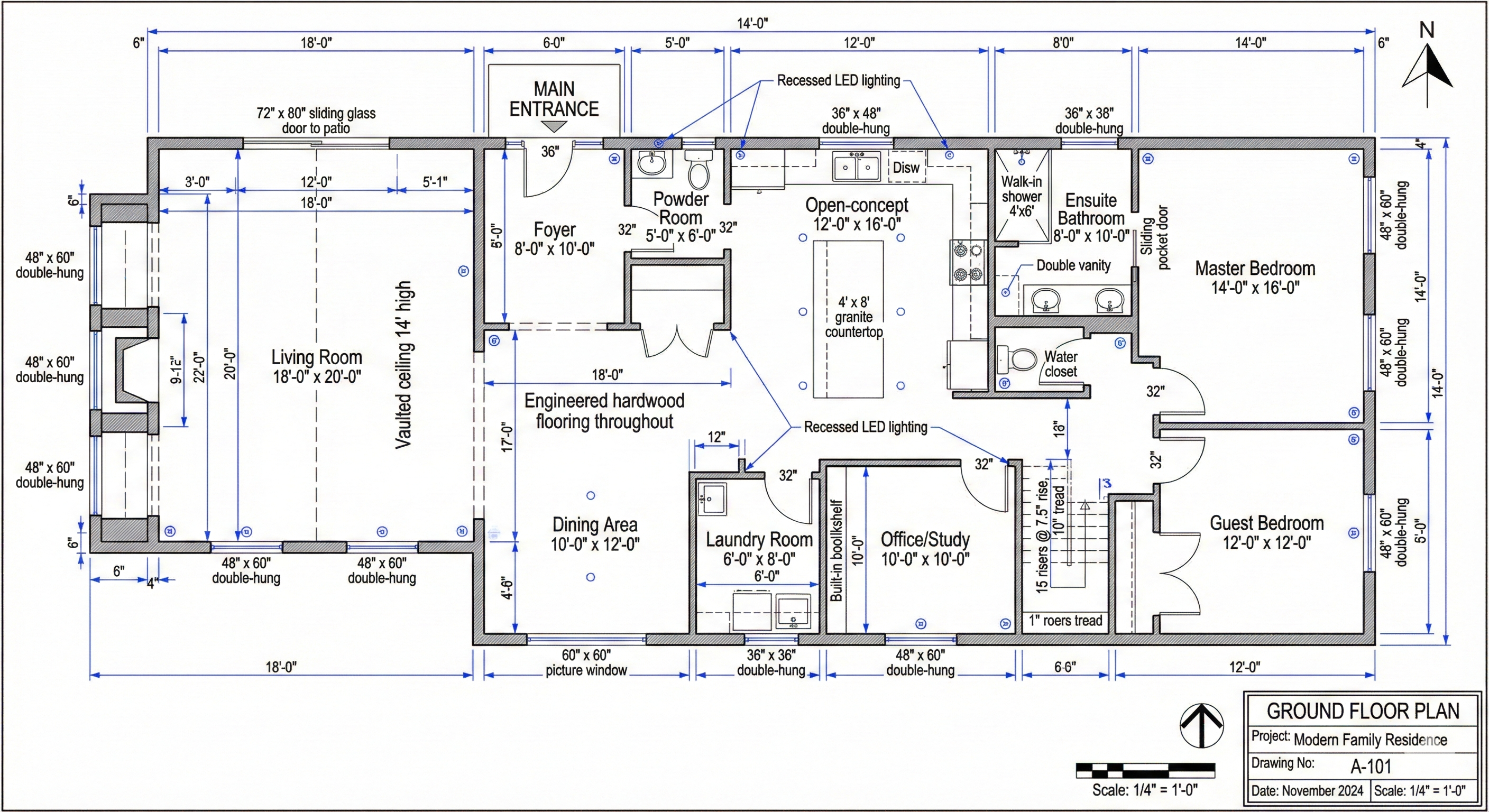
Architectural Blueprint Generated by Nano Banana Pro
📝 Click to View Detailed Prompt
Generate a professional architectural floor plan for a modern two-story residential house in the style of technical blueprints used by architects and engineers. The plan should show the ground floor layout with precise measurements and annotations. Include the following rooms with clearly labeled dimensions: Main entrance foyer (8' x 10'), Living room (18' x 20') with a notation "Vaulted ceiling 14' high", Open-concept kitchen (12' x 16') with an island marked "4' x 8' granite countertop", Dining area (10' x 12'), Powder room (5' x 6'), Master bedroom (14' x 16') with an ensuite bathroom (8' x 10') that includes text labels for "Walk-in shower 4'x6'", "Double vanity", and "Water closet", Guest bedroom (12' x 12'), Office/Study (10' x 10') with built-in bookshelves indicated, and a Laundry room (6' x 8'). Show wall thicknesses as 6 inches for exterior walls and 4 inches for interior walls. Include door swings with standard architectural symbols showing 36" for main doors and 32" for bedroom doors. Add window placements marked with dimensions like "48" x 60" double-hung" or "72" x 80" sliding glass door to patio". Include a staircase with text showing "15 risers @ 7.5" rise, 10" tread". Draw in plumbing fixtures in bathrooms and kitchen with standard symbols. Add electrical outlet symbols throughout (small circles with lines). Include a north arrow pointing up-right. Add a scale indicator showing "Scale: 1/4" = 1'-0"". Include a title block in the bottom right corner with text reading "GROUND FLOOR PLAN", "Project: Modern Family Residence", "Drawing No: A-101", "Date: November 2024", and "Scale: 1/4" = 1'". Use the traditional blue background with white lines characteristic of blueprints, or alternatively, use a clean white background with black lines and blue accent colors for dimensioning. Make absolutely certain that all dimension text is crisp, legible, and professionally formatted. Add notation callouts for important features like "Engineered hardwood flooring throughout" and "Recessed LED lighting in kitchen and living areas". The overall drawing should be precise, technical, and suitable for actual construction use.

Example 4: Quantum Computing Circuit Diagram
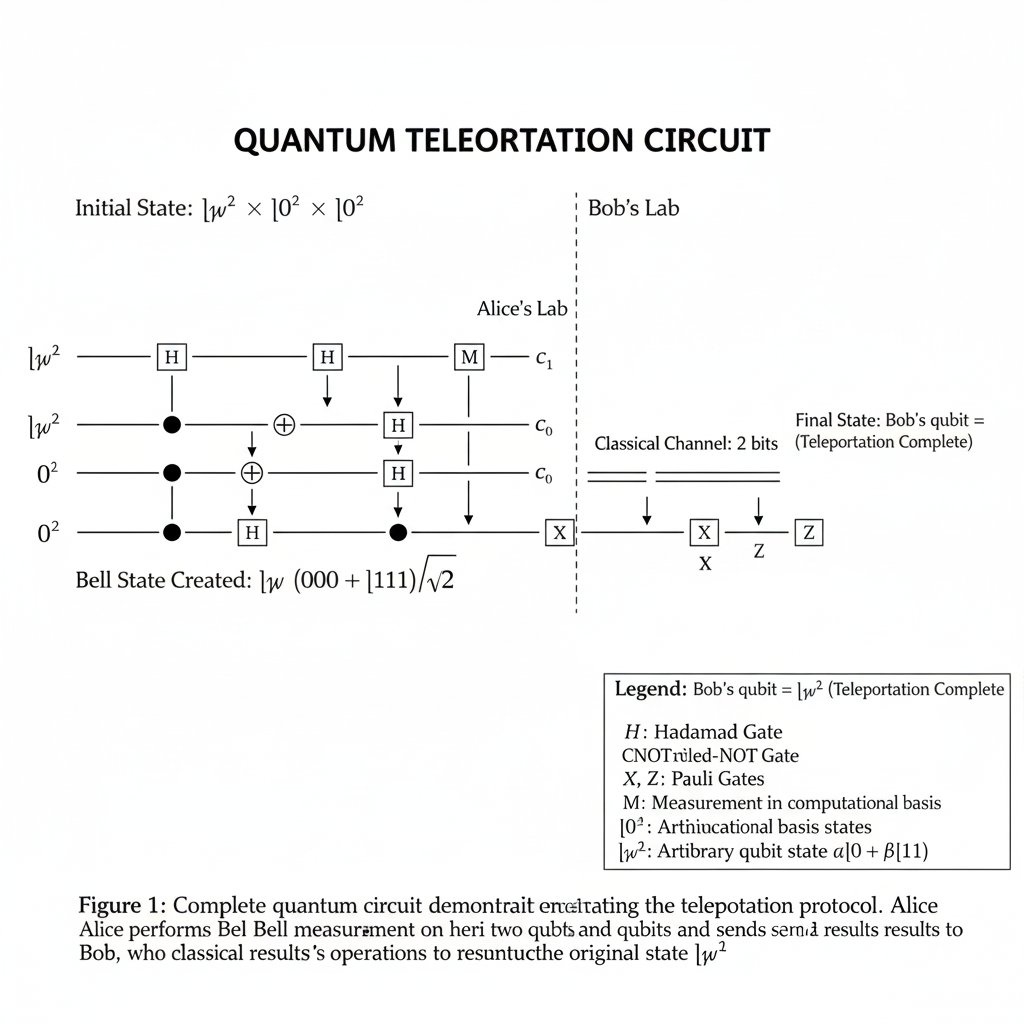
Quantum Circuit Diagram Generated by Nano Banana Pro
📝 Click to View Detailed Prompt
Create a highly detailed quantum circuit diagram illustrating a quantum algorithm for quantum teleportation. The diagram should be in the professional style used in academic papers on quantum computing, with a clean white background and precise technical notation. Structure the circuit horizontally with time flowing from left to right. Show three quantum bit (qubit) lines arranged vertically: - Top line labeled "|ψ⟩" representing the quantum state to be teleported - Middle line labeled "|0⟩" (Alice's qubit) - Bottom line labeled "|0⟩" (Bob's qubit) The circuit should include the following gates and operations in sequence: 1. At the beginning, show the initial state with text annotation: "Initial State: |ψ⟩ ⊗ |0⟩ ⊗ |0⟩" 2. First, show a Hadamard gate (H) on the middle qubit, drawn as a square box with "H" inside 3. Next, show a CNOT (controlled-NOT) gate connecting the middle qubit (control) to the bottom qubit (target), drawn with a filled circle on the control line and a ⊕ symbol on the target line 4. Add a text annotation: "Bell State Created: |ψ⟩ ⊗ (|00⟩ + |11⟩)/√2" 5. Draw a vertical dashed line labeled "Alice's Lab" on the left side and "Bob's Lab" on the right side to show the spatial separation 6. Show another CNOT gate with the top qubit (|ψ⟩) as control and middle qubit as target 7. Show another Hadamard gate (H) on the top qubit 8. Show measurement gates (drawn as meter symbols with "M" inside) on both the top and middle qubits, with arrows pointing to classical bit lines labeled "c₁" and "c₀" 9. Show classical communication lines (drawn as double lines) carrying the measurement results from Alice to Bob, labeled "Classical Channel: 2 bits" 10. On Bob's qubit line, show two conditional gates: - An X gate (drawn as a box with "X" inside) controlled by classical bit c₀ - A Z gate (drawn as a box with "Z" inside) controlled by classical bit c₁ 11. At the end, add text: "Final State: Bob's qubit = |ψ⟩ (Teleportation Complete)" Include the following additional annotations: - Add mathematical expressions at key points showing the quantum state evolution - Label the algorithm title at the top: "QUANTUM TELEPORTATION CIRCUIT" in bold text - Add a legend box in the bottom right explaining the symbols: "H: Hadamard Gate" "CNOT: Controlled-NOT Gate" "X, Z: Pauli Gates" "M: Measurement in computational basis" "|0⟩, |1⟩: Computational basis states" "|ψ⟩: Arbitrary qubit state α|0⟩ + β|1⟩" - Include a caption at the bottom: "Figure 1: Complete quantum circuit demonstrating the teleportation protocol. Alice performs a Bell measurement on her two qubits and sends the classical results to Bob, who applies corrective operations to reconstruct the original state |ψ⟩." Use standard quantum circuit notation with thin black lines for qubit wires, gates drawn as rectangles, and proper mathematical symbols (ket notation, Greek letters, etc.). Ensure all mathematical notation is perfectly rendered with proper subscripts, superscripts, and special symbols like ⊗ (tensor product), ⊕ (XOR), √ (square root), and vertical bars for quantum states. The diagram should be publication-quality and suitable for inclusion in a quantum computing research paper or advanced physics textbook.

Example 5: Climate Change Data Visualization Infographic
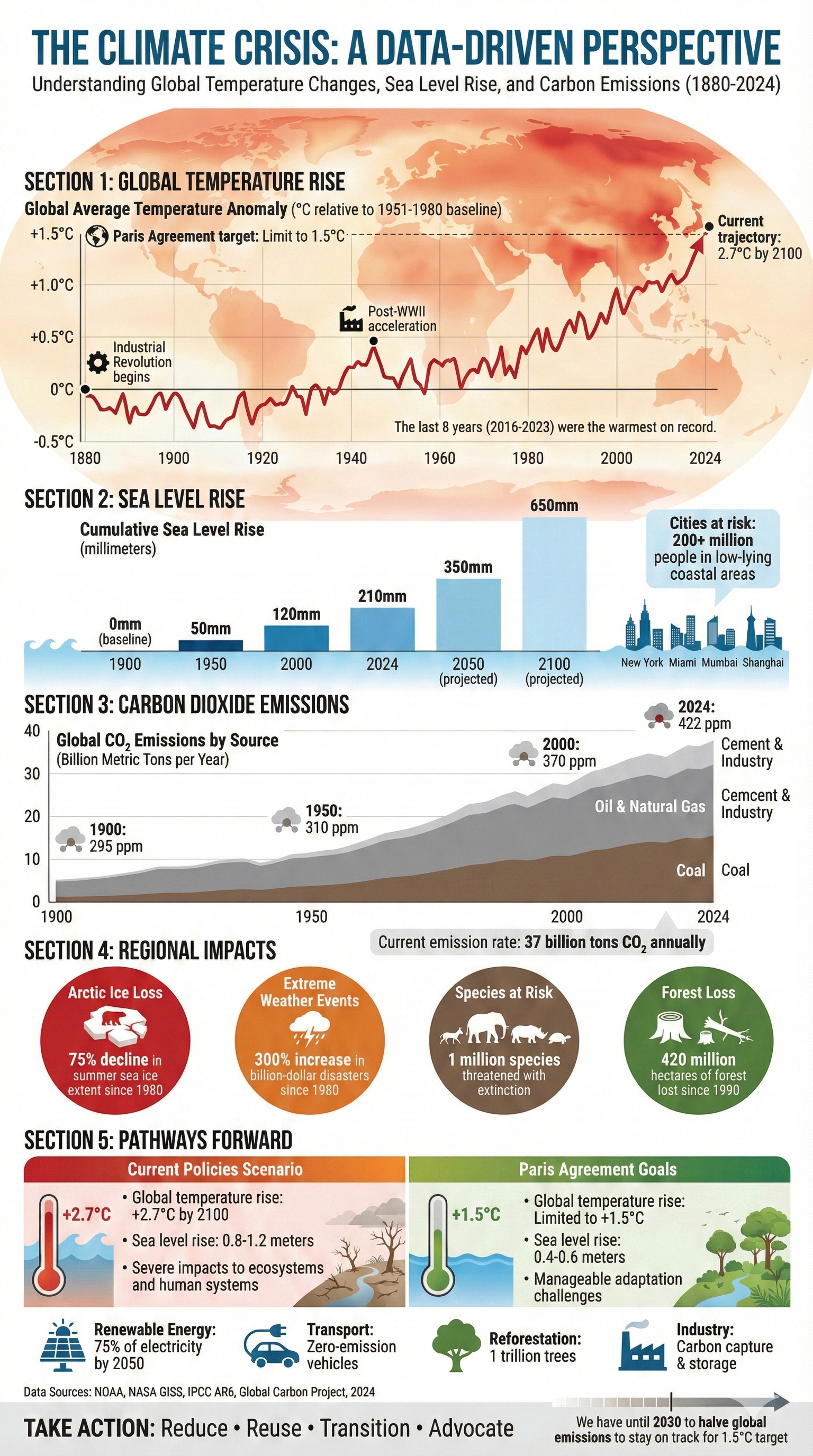
Climate Data Infographic Generated by Nano Banana Pro

Testing: Comprehensive climate data visualization with multiple charts (line graph, bar chart, area chart), 50+ data labels, statistical annotations, legends, and complex visual hierarchy 🌍📊

📝 Click to View Detailed Prompt
Create a comprehensive, professional infographic about global climate change impacts and trends, designed in a modern, editorial style suitable for publication in National Geographic or Scientific American. The infographic should be arranged in a vertical layout with multiple integrated data visualizations and clear typography. HEADER SECTION: - Main title at the top: "THE CLIMATE CRISIS: A DATA-DRIVEN PERSPECTIVE" in bold, impactful sans-serif font (like Futura or Helvetica Bold), colored in deep ocean blue - Subtitle below: "Understanding Global Temperature Changes, Sea Level Rise, and Carbon Emissions (1880-2024)" in smaller text - Add a world map silhouette in the background with subtle heat map coloring showing temperature anomalies SECTION 1 - GLOBAL TEMPERATURE RISE: - Create a line graph showing "Global Average Temperature Anomaly (°C relative to 1951-1980 baseline)" - X-axis: Years from 1880 to 2024, labeled every 20 years - Y-axis: Temperature anomaly from -0.5°C to +1.5°C, with gridlines - Show a rising trend line in red, starting near 0°C in 1880 and reaching approximately +1.2°C by 2024 - Mark significant points with dots and annotations: * "Industrial Revolution begins" at 1880 * "Post-WWII acceleration" at 1950 * "Paris Agreement target: Limit to 1.5°C" as a horizontal dashed line * "Current trajectory: 2.7°C by 2100" with an arrow - Include text: "The last 8 years (2016-2023) were the warmest on record" SECTION 2 - SEA LEVEL RISE: - Create a blue gradient bar chart showing "Cumulative Sea Level Rise (millimeters)" - Show measurements: 1900: 0mm (baseline), 1950: 50mm, 2000: 120mm, 2024: 210mm, 2050 (projected): 350mm, 2100 (projected): 650mm - Use darker blue for historical data, lighter blue for projections - Add small icons of coastal cities (New York, Miami, Mumbai, Shanghai) with text indicating "Cities at risk: 200+ million people in low-lying coastal areas" - Include wave illustrations at the bottom of this section SECTION 3 - CARBON DIOXIDE EMISSIONS: - Create a stacked area chart showing "Global CO₂ Emissions by Source (Billion Metric Tons per Year)" - Show three layers: * Bottom layer (brown): "Coal" reaching 15 Gt by 2024 * Middle layer (grey): "Oil & Natural Gas" reaching 20 Gt by 2024 * Top layer (light grey): "Cement & Industry" reaching 5 Gt by 2024 - X-axis: 1900, 1950, 2000, 2024 - Y-axis: 0 to 40 billion metric tons - Add atmospheric CO₂ concentration annotations: "1900: 295 ppm", "1950: 310 ppm", "2000: 370 ppm", "2024: 422 ppm" - Include text warning: "Current emission rate: 37 billion tons CO₂ annually" SECTION 4 - REGIONAL IMPACTS: Create four circular stat indicators in a row: - Circle 1 (red): "Arctic Ice Loss" - "75% decline in summer sea ice extent since 1980" with a small Arctic map icon - Circle 2 (orange): "Extreme Weather Events" - "300% increase in billion-dollar disasters since 1980" with a storm icon - Circle 3 (brown): "Species at Risk" - "1 million species threatened with extinction" with a wildlife silhouette - Circle 4 (green): "Forest Loss" - "420 million hectares of forest lost since 1990" with a tree icon SECTION 5 - PATHWAYS FORWARD: - Create a horizontal comparison showing two scenarios side by side: Left side (red/orange gradient): "Current Policies Scenario" * "Global temperature rise: +2.7°C by 2100" * "Sea level rise: 0.8-1.2 meters" * "Severe impacts to ecosystems and human systems" Right side (green gradient): "Paris Agreement Goals" * "Global temperature rise: Limited to +1.5°C" * "Sea level rise: 0.4-0.6 meters" * "Manageable adaptation challenges" - Add solution icons at the bottom: * Solar panel icon: "Renewable Energy: 75% of electricity by 2050" * Electric car icon: "Transport: Zero-emission vehicles" * Tree icon: "Reforestation: 1 trillion trees" * Factory icon: "Industry: Carbon capture & storage" FOOTER SECTION: - Add data sources in small text: "Data Sources: NOAA, NASA GISS, IPCC AR6, Global Carbon Project, 2024" - Include a call to action: "TAKE ACTION: Reduce • Reuse • Transition • Advocate" - Add a small timeline showing: "We have until 2030 to halve global emissions to stay on track for 1.5°C target" DESIGN SPECIFICATIONS: - Use a color palette of deep blues, reds/oranges for warming data, greens for solutions - Ensure all graph axes are clearly labeled with units - Make all numerical data perfectly legible in a clean sans-serif font - Include small icons and illustrations to break up the data - Use consistent spacing and alignment throughout - Add subtle background elements like world map outlines, grid patterns, or molecular structures - Ensure the overall design is both informative and visually engaging, suitable for sharing on social media or educational materials - All text must be crisp, accurate, and professionally typeset - Use infographic best practices: visual hierarchy, data-ink ratio, clear legends

🚀 Powered by Gemini 3 Pro

Nano Banana Pro leverages the full power of Google's Gemini 3 Pro model, which brings:

  • Advanced Language Understanding: Captures nuance and depth in your prompts
  • Multimodal Processing: Seamlessly works with text and image inputs together
  • Real-world Reasoning: Applies logic and world knowledge to generate accurate visuals
  • Iterative Intelligence: Understands context from previous generations for consistent results
  • SynthID Watermarking: Every image includes invisible digital watermarks for identification

Conclusion

Nano Banana Pro represents the cutting edge of AI image generation. With its exceptional text rendering capabilities, deep world knowledge, multilingual support, and studio-quality control, it's transforming how professionals create visual content.

These 5 advanced examples demonstrate the model's ability to handle:

  • Complex technical diagrams with precise notation
  • Multilingual content with perfect character rendering
  • Detailed data visualizations with multiple chart types
  • Professional-grade layouts with sophisticated typography
  • Intricate compositions with 50+ text elements

Ready to go bananas with AI? Try these prompts in Nano Banana Pro and experience the future of image creation! 🍌✨🎨